Douyin
Screenshots
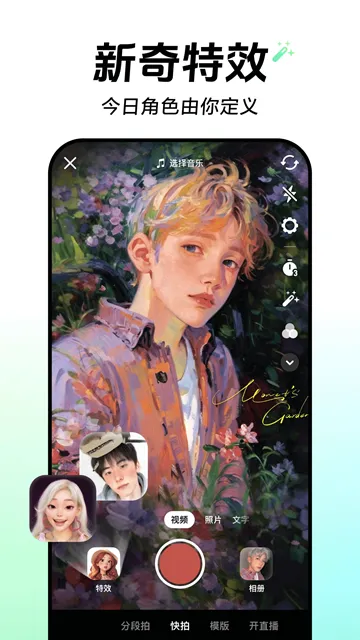
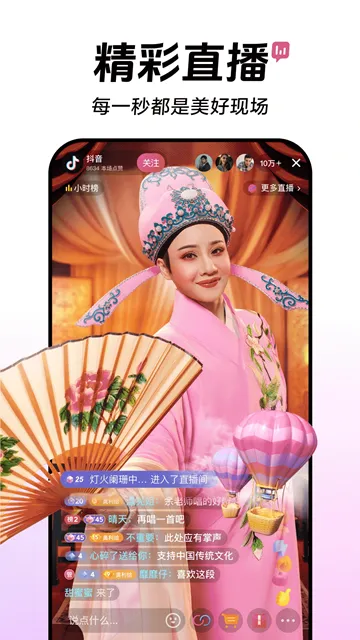
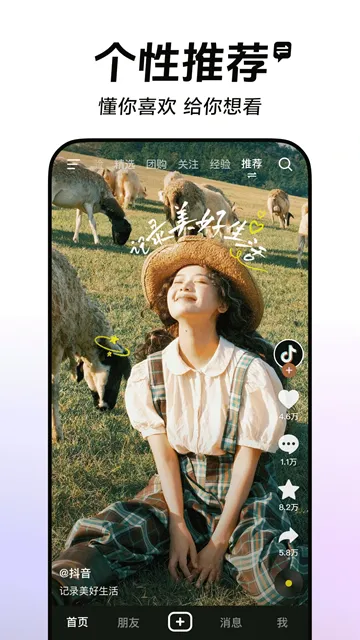
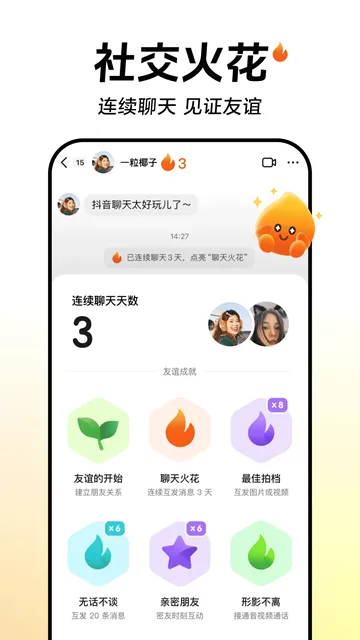
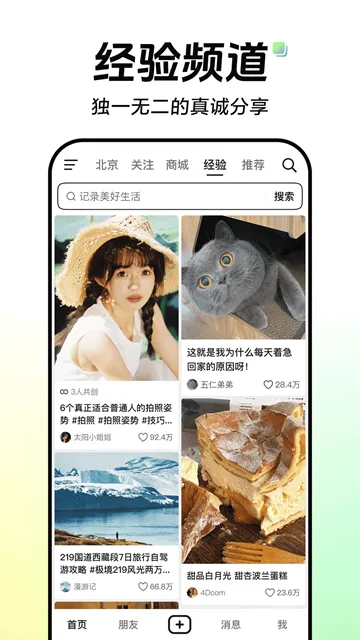
Douyin serves as the original blueprint for the global sensation TikTok. Created by ByteDance, this short-video platform dominates the digital landscape in mainland China. While TikTok caters to international audiences, Douyin focuses exclusively on the Chinese market with a massive ecosystem of features. It functions as much more than a simple entertainment app; it is a lifestyle hub where users shop, learn, and socialize.
The application uses a sophisticated recommendation engine to curate a “For You” feed. This algorithm learns your preferences in real-time based on your interactions. Within minutes of scrolling, the app identifies your interests and delivers highly relevant content. Millions of creators use the platform to share everything from comedy sketches to professional educational courses. This constant stream of creativity keeps users engaged for hours every day.
How to Download & Install Douyin APK on Android (Chinese Version of TikTok)
Douyin serves as the Chinese version of TikTok. It offers unique filters, exclusive live streams, and advanced e-commerce features. Since it remains exclusive to mainland China, you will not find it on the Google Play Store. You must download the APK file directly to your Android device.
Follow this guide to download and install Douyin safely and quickly.
Prepare Your Android Device
Android devices block apps from outside the official store by default. You must change your settings to allow the installation. This step ensures your phone accepts the Douyin file.
- Open the Settings menu on your phone.
- Navigate to Security or Privacy.
- Look for the option labeled Install Unknown Apps or Unknown Sources.
- Select your web browser (like Chrome) and toggle the switch to Allow.
Download the Douyin APK
- Open your mobile browser.
- Go to Filetomob.com website.
- Navigate to Douyinn app page.
- Look for the large download button.
- Tap the button “Download Douyin APK” to start the download.
- Wait for the progress bar to finish.
Install the Application
Once the download ends, you can start the installation. Your phone will handle most of the work automatically.
- Find the downloaded file in your browser’s Downloads folder.
- Tap on the file name to open it.
- A prompt will appear asking if you want to install the app.
- Tap Install.
- Wait a few seconds for the process to complete.
- Tap Open to launch the app.
Navigate the Interface
The app interface looks very similar to TikTok. However, the language is entirely in Chinese. You can still enjoy the content without knowing the language.
- Swipe up to view the next video.
- Double-tap to like a post.
- Tap the magnifying glass to search for trending topics.
- Use the “Me” icon in the bottom right to view your profile.
Creating an Account
You can watch videos as a guest. To follow creators or save videos, you need an account.
- Douyin often accepts international phone numbers.
- Select your country code from the list during registration.
- Enter your mobile number and wait for the SMS code.
- Input the code to verify your identity.
Get Started with Douyin on Android: Language and Permissions
Setting up Douyin on an Android device allows you to access a massive world of creative short-form content. Because this app targets the mainland Chinese market, the initial setup involves specific steps regarding language and privacy. Follow this guide to navigate the installation and configuration process smoothly.
Understanding the Interface Language
One important fact about Douyin is that it primarily uses a Chinese interface. Unlike the international version of TikTok, Douyin does not offer a dedicated English menu setting within the app.
- Default Language: The app automatically displays text in Simplified Chinese.
- System Settings: Changing your Android system language to English will not change the Douyin menus.
- Visual Navigation: Most users who do not speak Chinese rely on icons and visual cues to navigate.
- Translation Tools: You can use screen translation apps to read specific settings or buttons during your first setup.
While the lack of an English interface seems challenging, the layout mimics TikTok almost exactly. If you know where the “Profile” or “Settings” buttons are on TikTok, you can find them on Douyin.
Navigating the Initial Setup
When you first open the app, several prompts will appear on your screen. You must interact with these to enter the main feed.
- Service Agreement: A large pop-up will show the terms of service. Tap the large pink or red button to agree and continue.
- Home Feed: The app usually starts playing videos immediately.
- Account Creation: To follow creators or save videos, you must sign up. Tap the “Me” (我) icon in the bottom right corner.
- Phone Verification: Enter your mobile number. You will receive a code via SMS to verify your identity.
Managing Android Permissions
Android devices require you to grant specific permissions for Douyin to function correctly. The app asks for these access levels to help you create and share content.
Essential Permissions
- Storage: The app needs this to save videos to your phone or upload your own clips.
- Camera and Microphone: These are necessary if you plan to record videos or host live streams within the app.
- Internet Access: Douyin requires a constant data connection to stream high-definition content.
Optional Permissions
- Location: The app requests your location to show you local “Nearby” (附近) content. You can deny this if you prefer privacy.
- Contacts: This allows the app to find friends from your phone book. Many users choose to skip this step to keep their social circles separate.
How to Adjust Permissions Later
If you feel you granted too many permissions during the initial rush, you can change them at any time.
- Open your Android Settings.
- Select Apps or Application Manager.
- Find Douyin in the list of installed apps.
- Tap on Permissions.
- Toggle the switches to “Allow” or “Deny” based on your preference.
By following these steps, you maintain control over your data while enjoying the unique features of the platform. Stick to the official APK download to ensure your device remains secure throughout the installation.
Creating Douyin Account on Android
Douyin is the original Chinese version of TikTok. It offers a unique look into Chinese culture, trends, and entertainment. If you want to explore this platform, you need to set up an account correctly on your Android device. This guide explains the process step-by-step.
Choosing Your Registration Method
Douyin provides several ways to sign up. You can choose the method that feels most convenient for you.
- Phone Number: This is the most direct way to create an account. You can use a Chinese number or an international one.
- WeChat: If you already have a WeChat account, you can link it to Douyin for a faster login.
- QQ: Similar to WeChat, this popular Chinese messaging app allows for quick integration.
- Email: While less common now, some versions of the app still allow registration via a valid email address.
Signing Up with a Phone Number
Most international users prefer using their mobile numbers. Follow these steps to ensure a smooth process:
- Open the App: Tap the profile icon in the bottom right corner to trigger the login screen.
- Select Your Country Code: Look for the area code section. By default, it shows +86 (China). You must change this to your specific country code (e.g., +1 for the USA or +44 for the UK).
- Enter Your Number: Type your mobile number carefully. Avoid adding extra zeros at the start of the number.
- Request the SMS Code: Tap the button to send a verification code to your phone.
Tips for International SMS Verification
Sometimes, receiving a text from a Chinese server proves difficult. If the code does not arrive immediately, try these tips:
- Check Your Signal: Ensure you have a strong cellular connection.
- Wait for the Timer: Do not spam the “Resend” button. Wait for the countdown to finish before trying again.
- International Roaming: Ensure your service provider allows international text messages.
- Format Check: Double-check that you selected the correct country prefix. Even a small error prevents the code from reaching you.
Navigating the Chinese ID Verification
Douyin adheres to strict internet regulations in China. Because of this, the app often asks for real-name verification using a Chinese ID. This usually happens when you try to livestream or post specific types of content.
If you do not have a Chinese ID, you can still enjoy the app. Use the Guest Mode to browse videos without a full profile. However, if you want to follow creators or like videos, you must register.
If the app prompts you for an ID after you sign up, you might face limited access. For most international viewers, a basic account created with a phone number allows you to watch and interact with the majority of the content. Simply skip the ID verification pop-up if it appears. This keeps your account active for viewing purposes without needing local documents.
Finalizing Your Profile
Once you enter the SMS code, Douyin grants you access. Now you can customize your experience:
- Pick a Username: Choose a unique name that reflects your personality.
- Add a Bio: Tell people what you like or what you plan to share.
- Upload a Photo: A clear profile picture helps other users recognize you.
Following these steps makes the setup process easy. Even without a local ID, you can dive into the vibrant world of Douyin and discover global trends as they happen. Just stay patient with the verification process, and you will have access to millions of creative videos in no time.
Douyin: Essential Features for Android Users
Douyin serves as the original blueprint for modern short-form video. While many users compare it to TikTok, the Chinese version offers a vastly different ecosystem. Android users can access a powerhouse of creativity, social commerce, and advanced editing tools. This guide explores the core features that define the Douyin experience.
Immersive Vertical Video and Advanced Editing
Douyin prioritizes a seamless vertical viewing experience. Users scroll through a never-ending feed of high-quality content. The app utilizes every pixel of the Android screen to keep viewers engaged.
Powerful Creative Tools
The built-in video editor stands out as a professional-grade suite. Users do not need external apps to produce stunning visuals. Key components include:
- Chinese AR Filters: Douyin leads the market in Augmented Reality. Users apply intricate makeup filters, 3D environments, and face-tracking effects. These filters often lean toward traditional and modern Chinese aesthetics.
- Intuitive Cutting: The interface allows for frame-by-frame precision. You can sync transitions to the beat of a song with a single tap.
- AI Enhancements: The app automatically improves lighting and skin tones. This ensures that every upload looks polished and professional.
The Power of the Douyin Algorithm
Many people wonder how Douyin differs from its international sibling, TikTok. The secret lies in the underlying logic of the recommendation engine.
Interest-Based Discovery
Douyin focuses heavily on hyper-local content and specific niche interests. If you interact with a cooking video in Shanghai, the app quickly shows you more creators from that exact region.
Social Integration
Unlike TikTok, Douyin emphasizes “social circles.” The algorithm pushes content that your friends or local community enjoy. It bridges the gap between a global entertainment platform and a local social network. Consequently, users find relevant content faster and stay within the app longer.
A Revolution in E-commerce
Douyin transformed from a video app into a digital shopping mall. For Android users, the shopping experience feels native and fluid.
Shop Tabs and Live Sales
The app features dedicated shopping tabs. Users browse catalogs without leaving the video feed. Furthermore, live-stream shopping dominates the platform. Hosts demonstrate products in real-time while viewers click “buy” buttons directly on the screen.
Integrated Payments
The platform supports seamless transactions. Users link their digital wallets to complete a purchase in seconds. This eliminates the friction of traditional online shopping. By combining entertainment with commerce, Douyin creates a “shoppertainment” model that leads the world.
Global and Local Music Library
Music drives the energy of every video. Douyin provides an expansive library that caters to diverse tastes.
- Chinese Hits: Access the latest C-pop tracks and viral hits from mainland China.
- Global Catalog: The library includes trending western songs and international indie tracks.
- Original Audio: Users frequently create their own sounds. These “original audios” often turn into massive viral challenges within hours.
Live Streaming and Community
Live streaming on Douyin goes beyond simple chatting. It acts as a primary source of income for creators and a hub for community interaction. Android users enjoy high-definition streams with low latency.
Viewers send virtual gifts to support their favorite influencers. These interactions create a sense of belonging. Additionally, the live-stream feature includes interactive games and multi-user calls. This turns a passive viewing experience into an active social event.
Final Thoughts for Android Users
Douyin offers a complex, feature-rich environment. It rewards creativity with a precise algorithm and provides tools that make high-end production accessible to everyone. Whether you seek entertainment, shopping, or a global music library, Douyin delivers a comprehensive digital experience on Android devices.
Tips for Using Douyin on Android
Douyin offers a unique look into Chinese digital culture. While the app is designed for the Chinese market, Android users around the world can still enjoy it. Using it effectively requires a few specific adjustments to overcome regional hurdles and technical limits.
Overcoming Geo-Blocks with a VPN
Douyin often restricts content based on your IP address. If the app fails to load or shows limited videos, you likely face a geo-block. A Virtual Private Network (VPN) solves this issue.
- Choose a Reliable Provider: Select a VPN known for high speeds and stable connections.
- Select the Right Server: Connect to a server located in Mainland China or Hong Kong.
- Verify Connection: Check your IP status before opening Douyin to ensure the app recognizes the new location.
Using a VPN masks your actual location. It creates a secure tunnel for your data. This allows the app to function as if you were physically in the supported region.
Adjusting Region and Language Settings
The default interface for Douyin is Mandarin. While you cannot fully translate every button into English, you can tweak settings to make navigation easier.
- Locate the Profile Icon: Tap the person icon in the bottom right corner.
- Open the Menu: Tap the three horizontal lines in the top right.
- Find Settings: Look for the gear icon or the text 设置 (Shèzhì).
- Language Options: Navigate to 通用设置 (General Settings) and look for 语言 (Language).
Changing these settings helps the algorithm understand your preferences. Even if the UI remains mostly in Chinese, selecting a specific region can refine the content in your feed.
Optimizing for Battery and Data Usage
Android devices offer granular control over how apps consume power and data. Douyin is a high-definition video platform, so it drains resources quickly.
Battery Optimization
Go to your Android Settings, then Apps, and select Douyin. Under the Battery section, choose Optimized or Restricted if you want to prevent the app from running heavily in the background. This saves power when you aren’t actively watching videos.
Data Saving
Video streaming consumes massive amounts of mobile data. Inside the Douyin settings menu, look for the Data Saver mode.
- Lower Video Quality: This reduces the resolution slightly but saves gigabytes of data.
- Disable Auto-Play: Prevent videos from playing automatically when you are on a cellular network.
- Clear Cache Regularly: Douyin stores temporary files that take up storage space. Navigate to settings and tap Clear Cache to keep the app running smoothly.
Searching Without Chinese Characters
You do not need to be fluent in Chinese to find great content. You can use clever workarounds to navigate the search bar.
Use Pinyin
Pinyin is the Romanization of Chinese characters. If you want to find “food,” you can type Meishi. The app will recognize the phonetics and suggest the correct Chinese tags.
Use English Keywords
Many creators on Douyin use English tags to reach a global audience. Try searching for “Tech,” “Dance,” or “Fashion.” The results will often include videos with English descriptions or international appeal.
Copy and Paste
Use a translation app to convert your search terms into Simplified Chinese. Copy the result and paste it directly into the Douyin search bar. This provides the most accurate results for specific niches.
Follow Trends
Tap on the trending sidebar. Even if you cannot read the text, the icons and thumbnails indicate what is popular. Following these visual cues helps you discover viral challenges without typing a single word.
Final Android Performance Tips
Ensure your Android OS is up to date. Developers frequently release patches that improve app compatibility. If Douyin feels sluggish, restart your device to clear the system RAM. Always download the official APK from a trusted source to avoid security risks on your smartphone. By following these steps, you turn your Android phone into a window to a massive world of creative content.
Douyin’s Interface: Android-Specific Walkthrough
Navigating Douyin on an Android device feels different than using international social apps. The interface prioritizes speed and massive amounts of data. This guide breaks down the layout so you can master the app like a local.
Mastering the Homepage Layout
The homepage serves as your main entry point. When you open the app, it immediately plays a video. You will notice two main tabs at the top of your screen.
- Following Feed (Guanzhu): This tab sits on the left. It shows content only from accounts you follow. Use this to keep up with specific creators.
- Recommended Feed (Tuijian): This tab sits on the right. It functions like a “For You” page. It uses an algorithm to show you new trends based on your interests.
To switch between these feeds, simply swipe left or right across the center of the screen. Swiping up moves you to the next video. Swiping down returns you to the previous one. If you swipe left from the right edge of a video, you often enter the creator’s profile directly.
Using the Search Bar Effectively
The search bar is located at the top right corner of the homepage. It looks like a small magnifying glass. Finding content requires a bit of strategy since the app primarily uses Chinese.
- Pinyin Input: You can type Chinese words using Pinyin. The app will suggest the correct Chinese characters as you type.
- English Keywords: Some global brands and celebrities have English tags. However, English results are often limited.
- Pasting Characters: Use a translation app to find specific terms. Copy the Chinese text and paste it directly into the Douyin search bar for the best results.
- Voice Search: Tap the microphone icon. This works well if you know how to pronounce basic Chinese phrases.
Exploring Your Profile Page
Your profile page is the hub for your personal activity. Tap the “Me” (Wo) icon at the bottom right of the navigation bar.
- Your Videos: The first grid shows the content you have posted.
- Private Videos: A lock icon indicates videos that only you can see.
- Likes: Look for the heart icon. This section archives every video you have ever liked. It serves as a great way to save inspiration.
- Favorites: The bookmark icon stores saved sounds, effects, and organized folders.
Message and Notification Center
Stay connected by checking the “Message” (Xiaoxi) icon. This sits between the “+” button and your profile icon.
- Direct Messages: Private chats appear at the top of this list.
- System Notifications: Douyin sends alerts about new followers and likes here.
- Interactions: You can see who mentioned you in a comment or tagged you in a video.
Android users should note that notifications might look cluttered. Look for the colorful icons to distinguish between a “New Fan” alert and a “Live Stream” invitation.
Creating Content with the “+” Button
The large plus sign in the bottom center is your creation tool. When you tap it, the camera interface opens. You have two primary paths for creating content.
Recording Live
You can film directly within the app. Choose your music first by tapping the top “Add Sound” button. Then, hold the red circle to record. Douyin offers advanced beauty filters and AR effects specifically optimized for Android hardware.
Uploading from Gallery
Tap the “Upload” (Chuan) square to the right of the record button. On Android, the file picker might feel a bit different than on iOS. You may need to grant “All Files” access permissions for the app to see your latest screen recordings or edited clips.
Select your video, then use the “In-app Editor” to trim the length. You can add stickers, text overlays, and transitions before you hit the final “Publish” button. Using the native Android file picker allows you to select high-definition files directly from your “DCIM” or “Camera” folders.
Advanced Features Hidden on Douyin (Not in TikTok)
TikTok is famous worldwide, but its Chinese sibling, Douyin, operates in a completely different league. While both apps share a similar design, Douyin functions as a “super-app” that mixes social media, professional filmmaking, and high-tech retail. Here are the advanced features hidden on Douyin that you will not find on TikTok.
Professional Long-Form Content
TikTok primarily focuses on quick, bite-sized clips. In contrast, Douyin embraces professional video creators by offering long-form support.
- 15-Minute Uploads: Many users can post videos up to 15 minutes long.
- High-Quality Production: This longer limit allows for detailed documentaries, educational courses, and even full-length variety shows.
- Vlog Culture: Creators use this time to build deeper connections with their audience through “day in the life” stories that require more than a few seconds to tell.
Interactive Live Stream Games
Live streaming on Douyin is not just about watching someone talk. It is a highly interactive playground.
- Mini-Games: Viewers participate in small games directly inside the live stream window.
- Audience Influence: In some games, your comments or “likes” can change the game’s outcome or help the streamer win a challenge.
- Cloud Gaming: You can play these games instantly without downloading any extra software. This keeps users engaged for hours during a single broadcast.
Douyin Mall: The Ultimate Shopping Experience
Douyin Mall turns social scrolling into an instant shopping spree. Unlike TikTok’s external links, this is a closed-loop system.
- Internal Storefronts: You can browse entire brand catalogs without leaving the app.
- One-Tap Checkout: Your payment info and shipping address stay within the Douyin ecosystem for a seamless purchase.
- Track Everything: Users manage their orders, refunds, and customer service chats all in one place. It makes the app feel like Amazon and Instagram combined.
Smart QR Code Integration
Douyin uses QR codes to bridge the gap between the digital and physical worlds.
- Offline Challenges: You might see a Douyin QR code on a poster at a mall. Scanning it enters you into a specific hashtag challenge instantly.
- Product Links: Scanning a physical product’s code can lead you to a video review or a store page within the app.
- Social Connections: Users exchange personal QR codes in person to follow each other quickly.
Advanced AR Try-On Technology
The app uses cutting-edge Augmented Reality (AR) to help users shop with confidence.
- Virtual Makeup: You can test different shades of lipstick or eyeshadow that accurately match your skin tone.
- Accessories: Users virtually “wear” glasses, watches, or hats to see how they look before buying.
- High Precision: The AR tracks your face and body movements with extreme accuracy. This reduces the need for returns because you already know if the item suits you.
These features make Douyin more than just an entertainment app. It is a powerful tool for daily life, commerce, and professional creativity. While TikTok remains a social leader globally, Douyin sets the standard for what the future of social media could look like.
Douyin: Performance Optimization for Older Android Devices
Improving your experience on Douyin does not require the newest smartphone. Many users continue to enjoy this popular platform on older Android devices. However, older hardware often struggles with the high-demand video processing that Douyin requires. You can significantly boost performance by following a few strategic steps. This guide explains how to optimize Douyin for a smoother, lag-free experience.
Switch to Lite Mode
If your device feels slow, the standard Douyin app might be too heavy. The developers offer a specific version called Douyin Express or Lite Mode. This version uses fewer system resources and occupies less storage space. It focuses on core video viewing features while stripping away heavy background processes. By switching to the Lite version, you reduce the strain on your processor and memory. This shift often eliminates the stuttering common on older phones.
Clear Cache Regularly
Every video you watch on Douyin leaves behind temporary files. These files accumulate in your phone’s storage as cache. Over time, a large cache slows down the app and the entire operating system. You should clear this data at least once a week.
- Open the Settings menu within Douyin.
- Locate the Storage or Clear Cache option.
- Tap Clear to remove unnecessary files. This action frees up space and allows the app to load new content more efficiently.
Manage Data and Auto-Play
Auto-playing videos in high definition consumes a lot of processing power and data. You can ease the load on your device by disabling auto-play on mobile data. This integration works well with the Android system’s built-in data saver. When you limit how the app fetches data, the CPU does not have to work as hard to buffer multiple videos at once. Go to the playback settings and toggle the “Data Saver” or “Reduce Data Usage” switch.
Adjust Video Resolution
High-definition (HD) videos look great but demand high performance from older GPUs. If your playback is choppy, lower the resolution. Change the settings from HD to Standard Definition (SD).
- Standard definition requires less power to render.
- The video stream starts faster.
- Your phone stays cooler during long viewing sessions. Most users find that SD quality looks perfectly fine on smaller, older screens.
Use Android Battery Optimization
Background apps are the silent enemies of performance. They compete with Douyin for RAM and battery life. You can use the Android system settings to prioritize Douyin.
- Go to your phone’s Settings.
- Select Battery and then Battery Optimization.
- Find Douyin and ensure it is not being overly restricted while in use.
- Conversely, restrict other non-essential apps from running in the background. Closing background apps ensures that Douyin has full access to the device’s limited hardware power.
By following these simple techniques, you can turn a frustrating, laggy experience into a fluid one. Regular maintenance and smart setting adjustments keep older Android devices relevant and functional for modern entertainment.
Frequently Asked Questions About Douyin For Android
What Is Douyin for Android?
Douyin is a short-form video app developed by ByteDance. While it looks like TikTok, it serves the Chinese market. It features advanced e-commerce tools, high-quality live streams, and localized content. Android users prefer it for its deep integration with digital life in China.
Can I Use Douyin Outside of China?
Yes, you can use the app from anywhere in the world. However, some features might work differently. For example, local life services like restaurant bookings may require a Chinese location. Most users can still watch videos and follow creators without any issues.
Do I Need a Chinese Phone Number to Register?
You can browse videos as a guest without an account. If you want to like, comment, or post, you must register. Douyin now supports many international phone numbers.
- Open the login screen.
- Find the country code list (usually starts with +86).
- Select your country’s code (such as +1 for the USA).
- Enter your number and wait for the SMS verification code.
Why Is the App Only in Chinese?
Douyin is designed for the Mainland China market. Therefore, the interface remains entirely in Mandarin. The app does not offer a built-in English language setting. You can use a screen translation tool to help navigate the menus. Over time, the icons become easy to recognize.
How Does Douyin Differ from TikTok?
The two apps share the same DNA but offer different experiences. Douyin focuses heavily on social commerce. You can buy products directly within the app while watching a video. It also features more advanced AR filters and interactive live-streaming battles.
Can I change the language to English?
Yes, you can. First, go to your profile page. Then, tap the settings icon. Next, find the language option. Choose English from the list. The main menu will switch immediately. Still, many video titles and comments remain in Chinese.
Can I use Douyin without an account?
Yes, you can browse content as a guest. Simply open the app after installation. You can scroll through the main feed and watch viral videos. However, guest mode has limits. You cannot like videos, follow creators, or post your own content. You also cannot access the messaging features without a verified profile.
Can I live stream on Douyin from my Android phone?
Yes, but you need to meet requirements. You must have at least 1,000 followers. Also, your account must be older than 30 days. Go to the record screen. Swipe to the “Live” option. Tap “Start live stream.” The app then checks your permissions. After approval, you can broadcast live. Viewers can send you virtual gifts.
How do I save a Douyin video to my Android gallery?
Open the video you like. Tap the share icon on the right side. Then select “Save locally.” The app will ask for storage permission. Grant it once. The video then downloads to your phone’s gallery. Remember, not all creators allow downloads. Some videos do not show the save option.